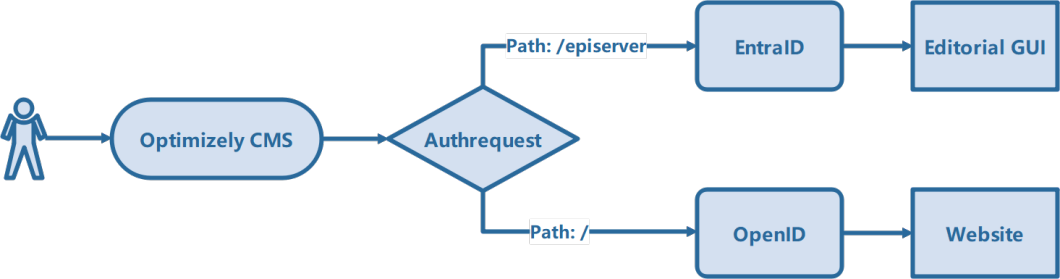
When you need to authenticate against more than one OpenID Connect provider in the same ASP.NET Core app – say IdentityServer for the public site and Microsoft Entra ID for Optimizely CMS – you quickly run into challenges: duplicate cookie schemes, mismatched role claims, and broken callback paths.
Here’s the approach that finally worked cleanly in .NET 8.
The Goal
-
/→ authenticates with IdentityServer (DuendeIdentity) -
/episerver/**→ authenticates with Azure AD / Entra -
Both share one local sign-in cookie (
"Smart") so[Authorize]andUser.IsInRole()behave consistently.
Configuring the CMS
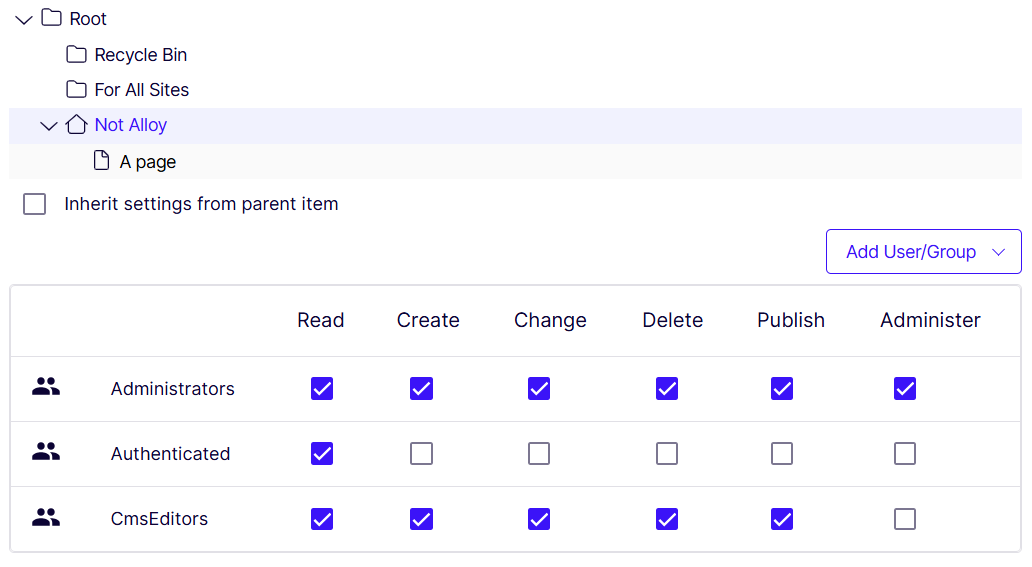
First and foremost you'll need to configure the CMS to allow other identityproviders to act. This is done by allowing everyone or authenticated users for the site root.
This is typically done in the Set Access Rights page in the CMS Admin gui, /EPiServer/EPiServer.Cms.UI.Admin/default#/AccessRights/SetAccessRights.
Implementing the Core Idea
Use a policy scheme to route challenges based on the request path, and make all remote handlers sign into the same cookie scheme.
services
.AddAuthentication(options =>
{
    options.DefaultScheme = "Smart";
    options.DefaultChallengeScheme = "dynamic-oidc";
})
.AddPolicyScheme("dynamic-oidc", "Select by url path", options =>
{
    options.ForwardDefaultSelector = context =>
        context.Request.Path.Value?.Contains("/episerver", StringComparison.CurrentCultureIgnoreCase) == true
        ? "EntraID"
        : "DuendeIdentity";
})
.AddOpenIdConnect("DuendeIdentity", options =>
{
    configuration.GetSection("DuendeIdentityServerOptions").Bind(options);

    options.RequireHttpsMetadata = false;
    options.CallbackPath = "/signin-oidc-duende";
    options.ResponseType = "code id_token"; // Hybrid flow
    options.GetClaimsFromUserInfoEndpoint = true;
    options.SaveTokens = true;

    options.TokenValidationParameters = new TokenValidationParameters
    {
        ValidateIssuer = false,
        RoleClaimType = ClaimConstants.Roles,
        NameClaimType = ClaimConstants.Name
    };
})
.AddMicrosoftIdentityWebApp(
    openIdConnectScheme: "EntraID",
    cookieScheme: "Smart",
    configureMicrosoftIdentityOptions: options =>
    {
        configuration.GetSection("EntraID").Bind(options);
        options.TokenValidationParameters = new TokenValidationParameters
        {
            RoleClaimType = ClaimConstants.Roles,
            NameClaimType = ClaimConstants.Name,
            ValidateIssuer = true
        };

        options.Scope.Clear();
        options.Scope.Add(OpenIdConnectScope.OfflineAccess); // if you need refresh tokens
        options.Scope.Add(OpenIdConnectScope.Email);
        options.Scope.Add(OpenIdConnectScope.OpenIdProfile);
        options.MapInboundClaims = false;
    },
    configureCookieAuthenticationOptions: options =>
    {
        options.AccessDeniedPath = "/AccessDenied";

        options.Cookie.Domain = null;
        options.Cookie.Name = "__Host-MyApp";
        options.Cookie.SameSite = SameSiteMode.Lax;
        options.DataProtectionProvider = DataProtectionProvider.Create("MyApp");

        options.Events.OnSigningIn = async ctx =>
        {
            if (ctx.Principal?.Identity is ClaimsIdentity claimsIdentity)
            {
                // Syncs user and roles so they are available to the CMS
                var synchronizingUserService = ctx
                    .HttpContext
                    .RequestServices
                    .GetRequiredService();

                await synchronizingUserService.SynchronizeAsync(claimsIdentity);
            };

            await Task.CompletedTask;
        };
    })
;
The config sections for IdentityServer and EntraID looks like this
"EntraID": {
  "Instance": "https://login.microsoftonline.com/",
  "Domain": "xxx.onmicrosoft.com",
  "TenantId": "xxx",
  "ClientId": "xxx",
  "ClientSecret": "xxx"
},
"DuendeIdentityServerOptions": {
  "Authority": "xxx",
  "ClientId": "xxx",
  "ClientSecret": "xxx",
  "Scopes": ["openid", "profile", "offline_access"]
},
Key Lessons
-
Unique callback paths for each OIDC scheme (
/signin-oidc-duende,/signin-oidc-azure). -
One cookie scheme shared by all (
"Smart"). -
Consistent role claim type across providers (
"roles"). -
PolicyScheme decides which provider handles a request.
With this setup, both IdentityServer4 and Entra ID work side-by-side, the correct IdP is chosen automatically, and authorization with [Authorize(Roles = …)] succeeds no matter which one signed you in.